I wonder if I put a few words here?

Category: Assignment 1 – Midterm Review – Module 1&2 Blog Posts and Comments

Module 2 Reflection

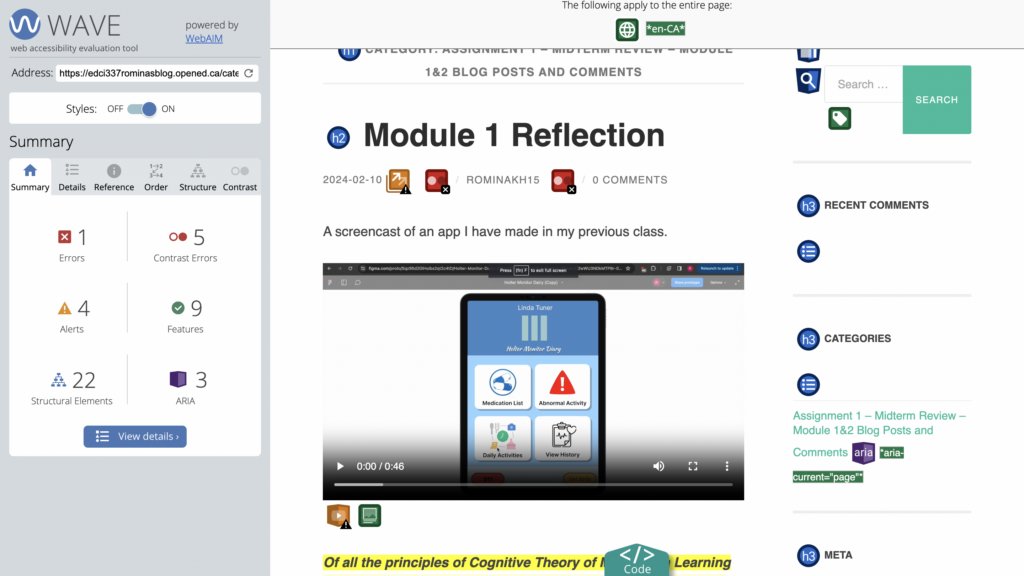
What did you find when you ran the WAVE accessibility report on your blog post(s)? What did you expect and what was surprising? Is there anything you will do differently going forward? 

I found more contrast mistakes than I had anticipated when I conducted my investigation. It surprised me how many contrast problems there were when I performed the WAVE accessibility assessment on my blog article. I’m going to focus more on colour contrast in the future and make sure that all users can access it better.
What role do you think media and multimedia can play in a learning environment designed with UDL guidelines in mind? Which of the promising practices for text, images and video are in alignment with these guidelines?

In a learning environment that is created with the Universal Design for Learning (UDL) standards in mind, media and multimedia are essential components. They provide you the freedom to convey knowledge in a variety of ways to meet the different demands of your students. Using a range of multimedia, such as text, music, photos, and videos, might be one way to do this. Using touch equivalents for important visuals that convey concepts and include explanations for all pictures, graphics, videos, and animations are promising practices for text, images, and video that comply with UDL criteria. Furthermore in accordance with these recommendations is providing options for adjusting the way information is shown, including text, image, graph, table, and other visual content sizes, as well as the contrast between the backdrop and text or picture. By ensuring that every student can comprehend and interact with the material, these procedures foster an inclusive and productive learning environment.

What does inclusive design mean to you?

The goal of designing for inclusion is to create environments, products, and services that are as user and understanding friendly as possible. This comprises those who are frequently left out or ostracized due to their circumstances, identity, or aptitude. In order to avoid discrimination and exclusion in design, inclusive design values diversity among people.

My Canva
Module 1 Reflection

A screencast of an app I have made in my previous class.

Of all the principles of Cognitive Theory of Multimedia Learning we looked at in this module, which seem most intuitive to you? Which ones surprised you?

Segmenting is considered intuitive because it makes learning easier by “chunking,” which is a natural approach in instructional design. Learners may progressively comprehend the material at their own speed by decomposing complicated concepts or information into smaller, more accessible steps. This approach lessens cognitive strain, which facilitates processing and memory of the information. It also allows students to take charge of their education by letting them take their time and fully understand each lesson before going on to the next.By making difficult knowledge more approachable and controllable, segmenting improves the learning process. It is surprising how effective the Personalization Principle can be in enhancing learning. I find it fascinating that using first person or second person language, such as contractions, can improve comprehension so significantly. According to this principle, our brains respond positively to friendly, informal tones, as if we were chatting one on one with the speaker. By using polite phrases, the learning experience feels more personalized and engaging. It can be challenging to achieve this naturalness, especially when facing a camera. What makes the Personalization Principle so fascinating is the surprising complexity behind what seems like a simple conversation.

Who did you imagine as the audience for this screencast? How did that impact your design choices?

This screencast was intended for the students and professor in my class. I wanted to create a screencast that was informative, engaging, and easy to understand for them. To achieve this, I used some of the tips from Module 1: How do We Learn? In my presentation, I used less text and more graphics to summarise the information and make it easier to understand. Besides using text size, colour, and icons to emphasise the key points, I also used icons to draw the audience’s attention. In my screencast, I emphasised the main idea and kept it short.

Welcome and Introduction

Before proceeding with this first blog post, we expect you to consider your privacy preferences carefully and that you have considered the following options:

  1. Do you want to be online vs. offline?
  2. Do you want to use your name (or part thereof) vs. a pseudonym (e.g., West Coast Teacher)?
  3. Do you want to have your blog public vs. private? (Note, you can set individual blog posts private or password protected or have an entire blog set to private)
  4. Have you considered whether you are posting within or outside of Canada? This blog on opened.ca is hosted within Canada. That said, any public blog posts can have its content aggregated/curated onto social networks outside of Canada.

First tasks you might explore with your new blog:

  • Go into its admin panel found by adding /wp-admin at the end of your blog’s URL
  • Add new category or tags to organize your blog posts – found under “Posts” (but do not remove the pre-existing categories or sub-categories).  If you would like to add more course categories, please do so (e.g., add EDCI 306A with no space for Music Ed, etc.)
  • See if your blog posts are appearing on the course website (you must have the course categories assigned to a post first and have provided your instructor with your blog URL)
  • Add pages
  • Embed images or set featured images and embed video in blog posts and pages (can be your own media or that found on the internet, but consider free or creative commons licensed works)
  • Under Appearance,
    • Select your preferred website theme and customize to your preferences (New title, etc.)
    • Customize menus & navigation
    • Use widgets to customize blog content and features
  • Delete this starter post (or switch it to draft status if you want to keep for reference)

Do consider creating categories for each course that you take should you wish to document your learning (or from professional learning activities outside of formal courses). Keep note, however, that you may wish to use the course topic as the category as opposed to the course number as those outside of your program would not be familiar with the number (e.g., we use “Multimedia Learning” instead of “edci337).

Lastly, as always, be aware of the FIPPA as it relates to privacy and share only those names/images that you have consent to use or are otherwise public figures. When in doubt, ask us.

© 2026 EDCI337rominasblog

Theme by Anders NorenUp ↑